Elite 3 GSPro & PurePlay Wireless Controller (Elite Sim Golf Edition) by Club Keyboard
Elite 3 GSPro & PurePlay Wireless Controller (Elite Sim Golf Edition) by Club Keyboard
Elite Sim Golf
7 in stock
Couldn't load pickup availability
Product Description
Product Description
Go Wireless Without Sacrificing Control
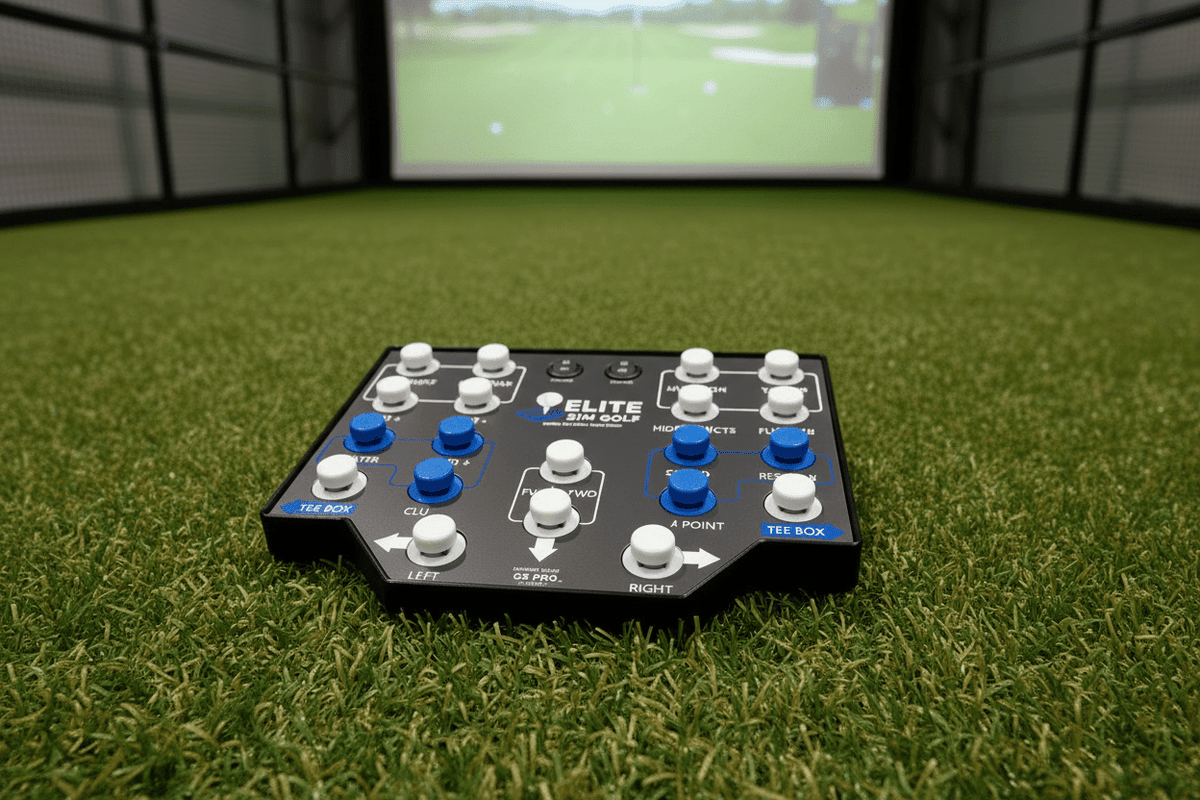
The Elite 3 GSPro Wireless Controller is the next generation of Elite Sim Golf's wireless lineup — delivering all the same plug-and-play GSPro functionality as before, now with upgraded buttons and significantly longer battery life. Cut the cable from your hitting area without losing a single button or compromising response.
With 20 pre-programmed buttons on redesigned, more responsive switches, a sloped viewing angle, and a removable faceplate system, the Elite 3 is built for sim golfers who demand a clean, capable bay setup that keeps going all day. It also works wired over USB-C whenever you need it — so you always have a fallback. No drivers. No software. Plug in, pair up, and play.
9 Reasons the Elite 3 Leads the Range
Wireless Bluetooth
Connects wirelessly via Bluetooth — no cable required between your hitting area and the sim PC.
20-Button Layout
Twenty pre-programmed buttons give you every essential GSPro function in a single controller, mapped to GSPro Layout 2 — two more than the Classic 2.
Wired USB Backup
USB-C port doubles as a wired connection, so you can switch to cable at any time without missing a shot.
Redesigned Switches
All-new Elite 3 mechanical switches deliver a firmer, more precise press than the previous generation — crisp tactile feedback with no mushy keycaps.
LED Backlighting
Eight LED-backlit buttons remain legible in dim sim rooms and add a clean, purposeful visual to the bay.
Sloped Viewing Angle
The controller body is angled so labels face you naturally from the hitting position — no bending to read.
Removable Faceplate
The faceplate system lets you swap labels and layouts as Club Keyboard releases updates, protecting your investment.
45+ Hour Battery
A longer-lasting battery keeps the Elite 3 running through more sessions between charges — a 50% improvement over the previous generation.
Stand OPTIONAL
An angled stand ships in the box, positioning the controller at the ideal height and tilt right out of the gate.
Specs and What Ships with the Controller
| Elite 3 — Technical Specifications | |
|---|---|
| Buttons | 20 (8 LED-backlit, redesigned Elite 3 switches) |
| Connection | Bluetooth (wireless) or USB-C (wired) |
| Battery Life | 45+ hrs (up from 30+ hrs on Elite 2) |
| Port | USB-C (charge + wired mode) |
| Dimensions | 11.5" × 9" × 2" |
| LED | Yes — gaming-style switch backlighting |
| Stand | Optional (angled) |
| Faceplate System | Removable — supports future layout updates |
| Software Required | None — plug-and-play (emulates keyboard) |
Compatible Software
- GSPro
- TGC 2019
- PurePlay (compatible with upcoming release)
- Any simulator that supports keyboard shortcuts
What's in the Box
- Elite 3 controller (Elite Sim Golf Edition)
- USB-C charging cable
- Quick reference card
- Angled stand (Optional)
GSPro Button Mapping
20 BUTTONS. EVERY GSPRO CONTROL FROM YOUR HITTING AREA.
Every button on this controller is pre-programmed for GSPro — organized below by how you use them during a round. No configuration, no software, no shortcuts to memorize.
Re-center aim to the default line
Nudge aim direction left
Nudge aim direction right
Toggle aim-assist point on the green
Move left/right on the tee box
Select next club up
Select next club down
Switch directly to the putter
Toggle handedness for left/right-handed play
Fly the camera from tee to green
Toggle the overhead minimap
Zoom the minimap in
Zoom the minimap out
Toggle trees and objects for visibility
Overlay shot dispersion heat map
Toggle putting grid overlay on the green
Pull up the live scorecard
Display yardage to target
Retake the previous shot
Skip forward to the next hole
Go back to the previous hole
Clear shot tracer lines from the display
Who the Elite 3 is Built For
The Wireless-First Simmer
You refuse to run cables across your hitting area. The Elite 3 pairs over Bluetooth and stays out of your way while you focus on the shot.
The Clean Sim Bay Builder
You care about the look and layout of your sim room. The sloped design, angled stand, and LED lighting make the controller a purposeful part of the setup.
The GSPro Power User
You use GSPro seriously — tracking stats, managing aim points, changing clubs mid-round. Twenty pre-mapped buttons put every function within reach without alt-tabbing.
The Sim Room Upgrader
You've been using a basic wired controller and want more buttons, wireless freedom, and a build quality that matches the rest of your equipment investment.
Find the Right Club Keyboard for Your Sim Bay
Every Club Keyboard controller sold by Elite Sim Golf is pre-programmed for GSPro and works out of the box. The right model depends on your button count, connectivity, and bay layout preferences.
| Model | Buttons | Connection | Battery | LED | Stand | Price |
|---|---|---|---|---|---|---|
| Classic 2 | 18 | Wired USB | N/A | Yes | Included | $199.99 |
| Elite 3 — This Product | 20 | Bluetooth + USB | 45+ hrs | Yes | Included | $299.99 |
| Flex 5 | 20 | Bluetooth + USB-C | 30+ hrs | Yes | Sold separately | $279.00 |
| Flex 2 | 20 | Bluetooth + USB | 60+ hrs | Yes | Sold separately | $279.00 |
| Flex 3 | 20 | Bluetooth + USB | 30+ hrs | White / Blue / Green | Sold separately | $279.00 |
| Pro 2 | 28 | Bluetooth + USB | 60+ hrs | Yes | Sold separately | $299.00 |
All controllers are pre-programmed for GSPro. No software required.
Frequently Asked Questions
How does the Bluetooth pairing work?
The Elite 3 pairs like any standard Bluetooth keyboard. Put the controller into pairing mode using the dedicated button, then select it from your PC or Mac's Bluetooth device list. Once paired, the connection is remembered — future sessions reconnect automatically when the controller is powered on within range.
Does it require any software or drivers?
No. The Elite 3 is a plug-and-play controller that registers as a standard keyboard to your operating system. Every button is already mapped to the correct GSPro keyboard shortcut at the factory. No apps, drivers, or configuration utilities are needed before or after setup.
Can it also be used wired?
Yes. The USB-C port supports both wired operation and battery charging. Connecting the included USB-C cable switches the controller to wired mode, which is useful during initial setup, when Bluetooth is unavailable, or if you simply prefer a wired connection for a specific session.
How does the faceplate system work?
The Elite 3 features a removable faceplate that covers the button label area. When Club Keyboard releases updated layouts or label sets, you can swap the faceplate rather than replacing the entire controller. This protects the longevity of your investment if GSPro shortcut mappings change in future software updates.
What GSPro functions can I control?
The Elite 3 covers the full core GSPro command set: Flyover, Green Grid, Heat Map, Mulligan, Aim Point, Target, Range Finder, Show Pin, Go to Ball, Next Hole, Map Expand, Map +/−, Scores, Hide Objects, Prev Hole, Club +/−, Clear/Tracer, R/L Handedness, Putter, Tee Box, Forward/Back, Reset Aim, and Left/Right Aim.
Does it come with a stand?
Yes. An angled stand is included in the box. It positions the controller at a natural viewing angle from the hitting area so button labels remain readable without having to lean over the unit.
What's the battery life?
The Elite 3 delivers 45+ hours of wireless playing time per charge — a 50% improvement over the Elite 2's 30+ hour rating. The USB-C port allows you to recharge the battery at any time, and wired mode is available as a fallback if the battery is depleted during a session.
What's new on the Elite 3 compared to the Elite 2?
The Elite 3 keeps the same 20-button layout, sloped body, removable faceplate, and included stand that made the Elite 2 popular, and upgrades two things: the switches have been redesigned for a firmer, more precise press, and battery life is up to 45+ hours — a 50% increase over the Elite 2's 30+ hours.
What's the difference between the Elite 3 and the Flex 5?
The Elite 3 and Flex 5 are both 20-button, GSPro Layout 2-compatible controllers with Bluetooth and USB-C connectivity, but they take different approaches to layout and form factor. The Elite 3 uses a traditional push-button layout with a sloped body, removable faceplate, and stand included in the box, and rates 45+ hours of battery life. The Flex 5 uses a sleek, illuminated keyboard-style layout, does not include a stand, and rates 30+ hours of battery life. Choose the Elite 3 for dedicated push-button feel and the longest battery life in a sloped form factor; choose the Flex 5 for a modern illuminated keyboard-style layout.
What's the difference between the Elite 3 and the Flex 2?
Both controllers offer 20 buttons, Bluetooth + USB-C connectivity, and LED backlighting. The key differences are form factor, battery life, and included accessories: the Elite 3 has a sloped body design, a removable faceplate system, a stand included in the box, and 45+ hours of battery life. The Flex 2 uses a flat control-box form factor, lists a 60+ hour battery life, and does not include a stand. The Elite 3 is priced at $299.99; the Flex 2 at $279.00.
What's the difference between the Elite 3 and the Pro 2?
The Pro 2 offers 28 buttons — eight more than the Elite 3 — making it the right choice for power users who want dedicated buttons for every possible GSPro function. The Pro 2 lists a 60+ hour battery life versus 45+ hours on the Elite 3. Both are priced at approximately $299, but the Pro 2 does not include a stand while the Elite 3 does. Choose the Elite 3 for a cleaner, all-in-one package; choose the Pro 2 if maximum button coverage is the priority.
Does Elite Sim Golf offer setup support?
Yes. Elite Sim Golf provides direct phone and email support for every product sold. Reach the team at 866-4-SIM-GOLF. Staff are knowledgeable about Club Keyboard controllers and GSPro configuration, and can walk through pairing, layout questions, or any setup issue after purchase.
The Elite Sim Golf Difference
Buying a Club Keyboard controller from Elite Sim Golf means buying from an authorized dealer with same-day fulfillment, real expert support, and a direct relationship with the manufacturer.
Free Shipping
Free shipping on most orders to the continental United States — no threshold calculations, no surprise fees at checkout.
Same-Day Fulfillment
Orders placed before the daily cutoff ship the same business day, so your controller arrives fast.
Authorized Dealer
Elite Sim Golf is an authorized Club Keyboard dealer. Every unit is genuine, properly warranted, and sourced directly from the manufacturer.
Real Expert Support
Reach a real sim golf specialist at 866-4-SIM-GOLF — not a generic help desk. The team uses this equipment and can answer product-specific questions directly.
Every Club Keyboard controller sold by Elite Sim Golf ships same business day, comes with direct expert support, and is backed by an authorized dealer relationship with Club Keyboard. When you buy from Elite Sim Golf, you are buying from a team that knows simulator golf and stands behind every product it sells.